Nano Banana 2.1 vs Nano Banana 2: What Changed?
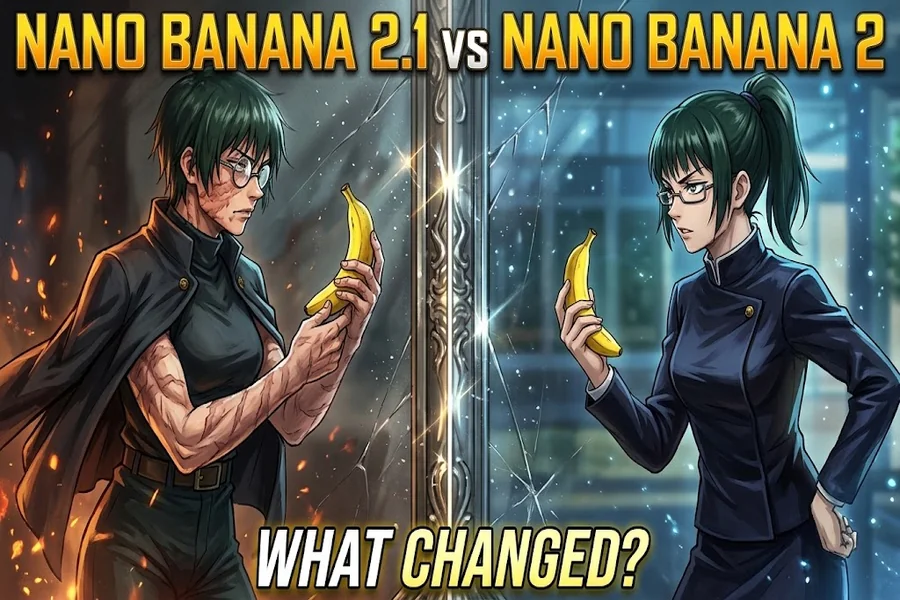
If you’re looking for a good Nano Banana 2.1 vs Nano Banana 2 comparison, it really comes down to the specific picture you want to make. Trying to get a clean portrait, a believable product photo, or a chart with readable text all demand completely different things from the model. The newer version clearly has some proven upgrades, but if they’re actually worth it just depends on where the old one is holding your work back.
Table of Contents
- Nano Banana 2.1 vs Nano Banana 2: What Google Actually Released
- What the Nano Banana Flash Name Tells You
- What Was Already Possible With Nano Banana 2?
- Text, Resolution, and Where Nano Banana Pro Fits
- An AI Figure Makes the Editing Differences Easier to Judge
- Don’t Mistake This Update for Nano Banana 3
Nano Banana 2.1 vs Nano Banana 2: What Google Actually Released
The naming is official. Google introduced version 2 as Gemini 3.1 Flash Image in February 2026, while its Cloud documentation dates the 2.1 release to October 6. The newer model has its own identifier, gemini-nano-banana-2.1. So the Nano Banana 2.1 vs Nano Banana 2 discussion concerns a documented update, although an app’s menu may present those names differently.
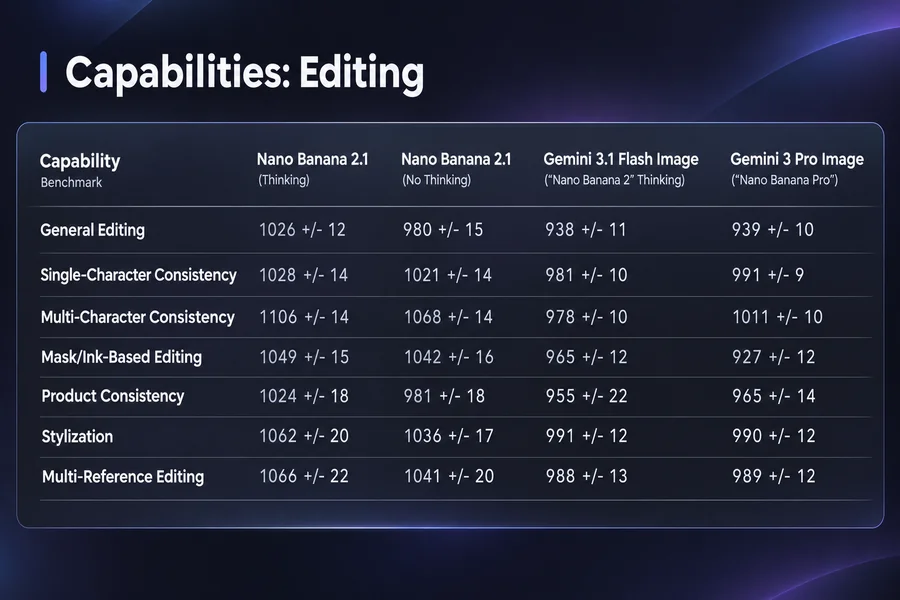
Google describes the update as improving visual design, subject consistency, and editing guided by masks or drawn marks. Those are worthwhile areas to improve if a small correction keeps changing something else in the picture. Someone asking for a different background usually wants the same person standing in front of it, with the same face and clothes.
Those big announcements really only tell us so much. This piece is just comparing their official features, and the example tasks are really just suggestions so you can try them out on your own. There weren’t any controlled, scientific image trials done for this article. Google’s benchmarks might point to general upgrades, but they won’t tell you if your specific character art or selfie will turn out perfect on the first go. You also have to factor in personal taste. Making a photo brighter doesn’t mean it’s a better edit, especially if you wanted to preserve the original atmosphere. Ultimately, the most important thing to evaluate is just whether the AI actually did what you told it to.
What the Nano Banana Flash Name Tells You
A label such as Nano Banana Flash doesn’t identify the version reliably enough by itself. Google’s original image model used Gemini 2.5 Flash Image, while version 2 used Gemini 3.1 Flash Image. The 2.1 model card identifies Gemini 3.6 Flash as its foundation. The useful detail is the complete model name, especially when comparing results from different websites.
If you’re just a regular user, Gemini is definitely the best jumping-off point: log in, hit image creation, and drop in a photo or describe what you’re imagining. Looking at Google’s US site right now, version 2 is free, and 2.1 is locked behind a Google AI plan (and paid plans give you higher generation caps). Your actual access still hinges on your specific account, though. The normal process hasn’t really changed: upload your image, tell it what to fix, and just ask for another tweak in the same chat if it’s not quite right. You don’t have to figure out a whole new desktop editing interface just because the version number bumped up.
Developer access is a whole other ballgame when it comes to paying. There’s no free tier for 2.1 on Google’s API pricing page, and those API fees are a completely different beast than a standard Gemini subscription. If you just want to edit a picture every once in a while, you really don’t need to learn how to use an API. Just a heads up: before dropping money on a third-party app, make sure to double-check which model it actually runs on and what your credits get you, especially if you need multiple tries or high-res images.
What Was Already Possible With Nano Banana 2?
Nano Banana 2 already supported image editing, multiple references, and text inside generated pictures. Its launch documentation also described output from 512 pixels through 4K, along with control over aspect ratios. These capabilities didn’t suddenly appear with the October update, so a comparison that presents every existing feature as new gives the wrong impression.
The stronger evidence for improvement comes from Google’s published evaluations. The 2.1 model card reports higher scores than its predecessor across general editing, character consistency, and several other image tasks. Those are Google’s own results, with particular evaluation settings. They support trying the newer model for demanding edits; they don’t translate into a fixed percentage improvement for every image.
Consider a portrait where the request is to change a jacket while keeping the face and pose. Success means all parts of that instruction survive together. A beautiful replacement jacket isn’t much help if the person now looks different. Google still lists partial instruction following and occasional spatial confusion among 2.1’s limitations. It makes sense to inspect the unchanged areas as carefully as the edited one. It helps to say what must stay unchanged, especially when the reference contains an unusual accessory or an important facial detail. That gives both versions a clearer job to attempt.
Text, Resolution, and Where Nano Banana Pro Fits
Nano Banana Pro is actually its own separate thing—specifically Gemini 3 Pro Image—not just a fancy new name for 2.1. If you’re on a paid plan, Google still gives you that “Redo with Pro” button. It’s a handy way to get a fresh take if an image isn’t quite right, but just because it has “Pro” in the name doesn’t automatically mean it’s going to be better.
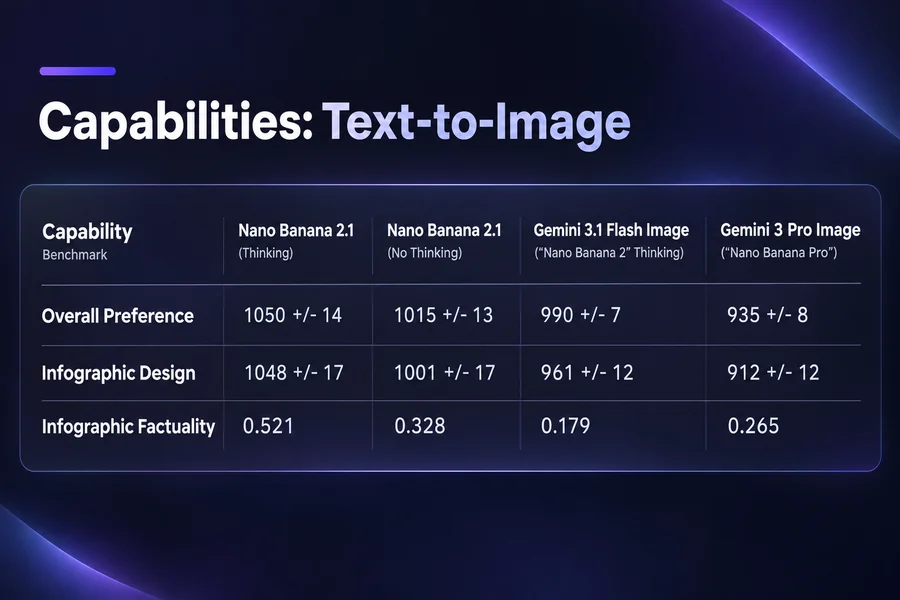
No matter which version you use, keep a close eye on the text. Version 2 could already handle text rendering and translation, and 2.1 promises to make it even clearer. Still, Google’s latest notes warn that tiny letters or long paragraphs can get messy. If you’re making a diagram, double-check every single label. For titles, make sure it’s actually spelled right before you get distracted by how cool the font looks. Honestly, if you know you might need to change the wording later, you’re better off adding it yourself in an editor. AI text is baked right into the picture, so fixing one typo usually means editing the image all over again.
You’ll want to watch your output sizes, too. The official specs for 2.1 say it can handle 1K, 2K, and 4K in square, portrait, or widescreen. But just because the model can do that doesn’t mean whatever app you’re using will actually let you. Always check the dimensions of the file you download. Upscaling gives you more pixels, but it won’t magically fix a typo or add a missing detail. Also, decide on your shape early on. Telling the AI to make a widescreen shot from scratch gives you a totally different result than just stretching a square one later, and good framing is just as important as crisp details.
An AI Figure Makes the Editing Differences Easier to Judge
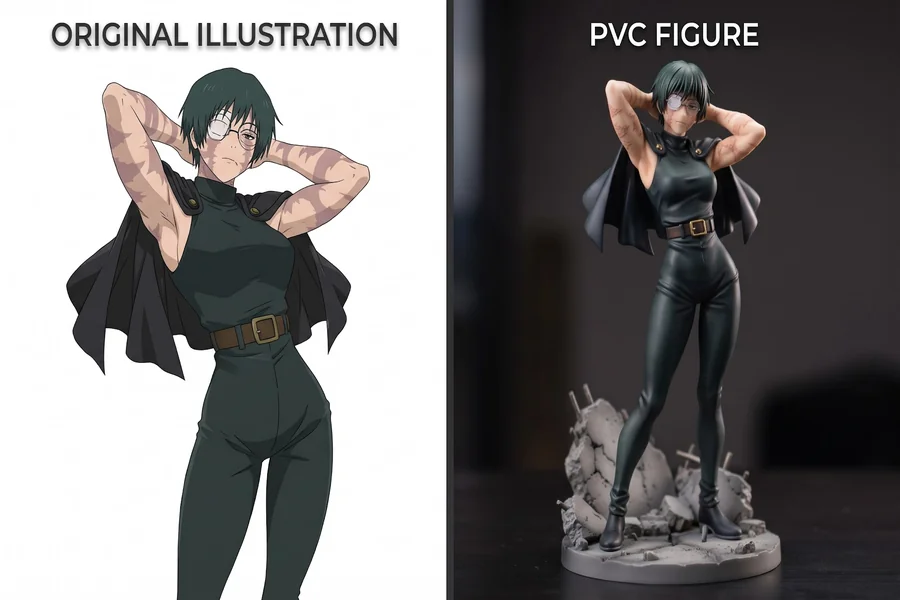
An AI figure is a useful example because the result has to change materials while keeping a recognizable character. A simple request might be: “Turn this character into a painted PVC collectible figure, keeping the hairstyle and outfit, with soft studio lighting.” The image should look like a photographed object while preserving the design that made the original appealing.
Start with the same unaltered reference and wording in both versions. Then request one follow-up change, such as turning the display base dark grey while leaving everything else alone. That second step can reveal more than the initial generation, because it checks whether the model can make a small adjustment without rebuilding the whole picture. Look at these details:
- If the face and hair still look like your original reference.
- If the little clothing details get lost when you change the material.
- If the edit you asked for actually stays where it’s supposed to.
- If the character’s look holds up after you give a new instruction.
- If the final image is actually the size you asked for.
Make sure to save your original image and every single result so you aren’t just relying on memory. It helps to jot down the model you used, the date, your exact prompt, and the settings, too. Picking one perfect image just shows what you like, but running it a few times shows how often the AI messes up. You can use this same checklist for real product shots, pictures of your pet, or any drawing where specific details really matter. Just be sure to keep the resolution and settings exactly the same, hold onto the bad generations, and run the same prompt multiple times. If you don’t, you might just end up liking the version that randomly got the better setup.
Don’t Mistake This Update for Nano Banana 3
As of November 6, 2026, the official materials checked for this article document 2.1; they don’t establish Nano Banana and Mixboard 3 as a released Google image model. A different version number on another website deserves checking against the underlying model it names. Readers shouldn’t have to guess whether they’re paying for a new Google release or a provider’s own label.
For the models that are documented, the decision is fairly practical. The older version remains worth using when it already gives a satisfactory result, especially for an occasional image. The newer one deserves consideration when editing accuracy or consistency keeps costing extra attempts. The table below separates capabilities that already existed from reasons to try the update.
| Task | Version 2 already offers | Why consider 2.1? |
| Simple portrait edit | Photo uploads and conversational edits | Try it if details keep changing |
| Several reference images | Multiple-image input | Improved consistency in Google’s evaluations |
| Diagram with labels | Text rendering | Advertised improvements; proofreading still needed |
| High-resolution image | Up to 4K through supported services | Check the app’s actual output options |
| Repeated small corrections | Follow-up editing | Documented gains in editing tasks |
For someone making a few pictures for fun, a newer name alone is a thin reason to subscribe. Keep the version that produces the image wanted with an acceptable amount of correction. If the frustration is having to repair the face every time the background changes, 2.1 addresses exactly the kind of problem worth comparing. Start with that troublesome image and judge the result at full size.